Upload the image you already have
JPG, PNG, WebP or HEIC from iPhone. Screenshots and exported posters work too — no layered file needed.

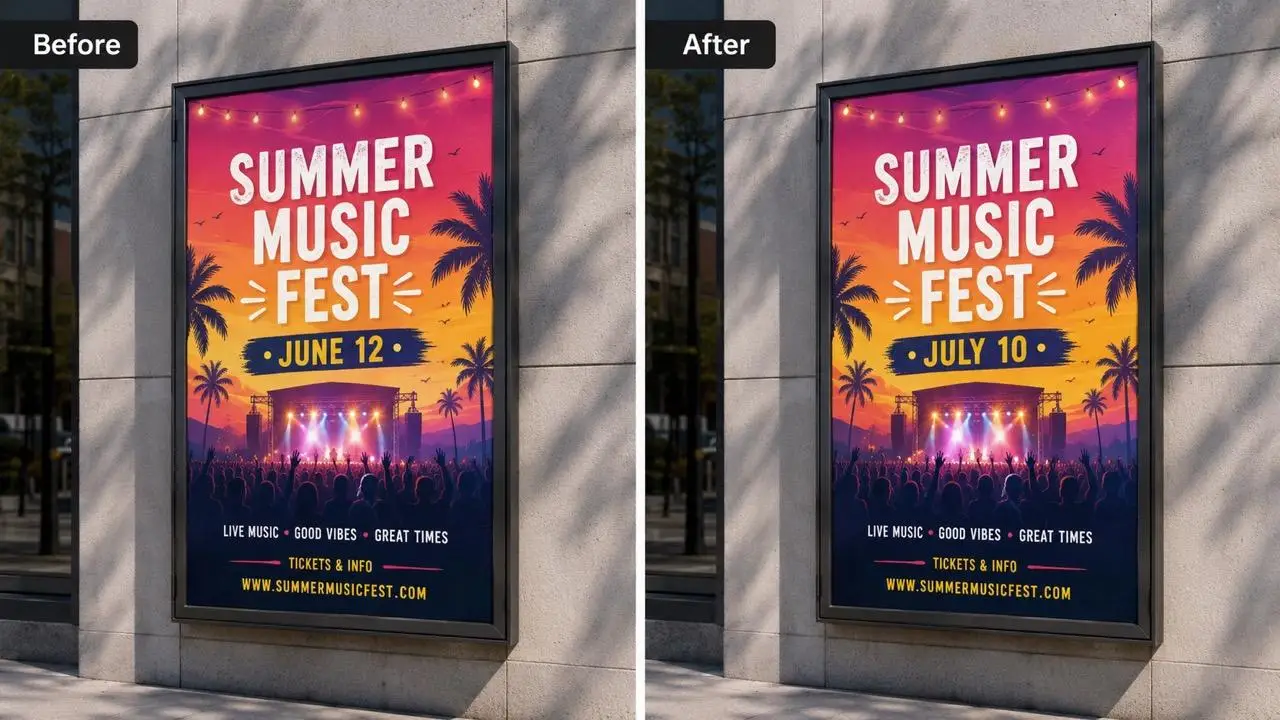
Have a photo, poster or product shot where one line of text is wrong? Upload it, describe the new wording in plain words, and download the edit — no layers and no Photoshop.
JPG, PNG, WebP or HEIC from iPhone. Screenshots and exported posters work too — no layered file needed.
One sentence is enough: “change 70% off to 50% off”. Mark an area if the image has several text blocks.
The model repaints the old words and blends the new ones into the background. Your free edit comes with a new account.
The full list is on Capabilities & Limits.
No. This page is built for images you only have as a JPG, PNG or screenshot. The model works from the pixels you upload — a PSD or AI file is not required.
Usually close, not always identical. Standard sans-serif and serif text match well; decorative, handwritten and stylised lettering may need a second attempt. We do not claim perfect font reconstruction.
JPG, PNG and WebP up to 10 MB. HEIC photos from iPhone are converted to PNG in your browser before upload. Each task keeps its own history, so you can upload the same image again later.
No. Forging IDs, passports, certificates, financial records, transcripts or contracts is blocked before an Edit is used. The full list is in the Acceptable Use Policy.
More questions are answered in the FAQ, and pricing details are on the pricing page.
Removable text, product prices, dates, menus and screenshots are all handled the same way: upload, describe, download.